LEARNING EXPERIENCE DESIGN
Technical onboarding program for a form automation platform
A learning system that moves new users from "I don't know how this works" to "I can confidently use this platform to solve a real business problem" — with instruction inside the product, support that scales to demonstrated need, and competency validated on real work.
THE PROBLEM
A sophisticated platform, with no structured pathways into it.
A low-code SaaS platform for form development and automation was powerful, but that power created a learning challenge.
New users needed to understand everything from form design and conditional logic to workflow automation, integrations, and troubleshooting. Without a structured path from foundational knowledge to hands-on application, learners could struggle to build confidence and become dependent on support.
WHERE LEARNERS GOT STUCK
Understanding what the platform is actually for
Navigating an interface built for many different jobs
Creating a form that works end to end
Configuring conditional logic and complex workflows
Building automation that reflects a real business rule
Connecting data to systems they don't own
Interpreting errors and isolating the cause
Translating training exercises into their own work
Slower time-to-competency
Weeks of trial and error before a first usable solution.
Support dependency
Specialists answered the same foundational questions repeatedly.
Increased frustration
Early failure at basic tasks eroded confidence in the product.
Inefficient implementation
Solutions were built in ways that were hard to maintain.
Underused capability
Automation and integrations were left on the table.
Weak knowledge transfer
Training tasks did not carry into real organizational work.
THE OPPORTUNITY
From “I don’t know how this works”, to “I can confidently use this platform to solve a real business problem”
The opportunity was to design a technical onboarding experience that didn't simply teach users how the product works, but helped them become confident enough to use it independently to solve real problems; a learning ecosystem.
A structured, progressive experience that balances foundational knowledge, guided instruction, hands-on practice, adaptive support, real-world application and competency validation.
ADAPTIVE DESIGN METHODOLOGY
Meet the learner where they are and progressively help them get where they need to go.
Beginner Path
Learn
Instructor explanation
Guided practice
Contextual hints
Adaptive support
Independent practice
Experienced Path
Knowledge check
Skip known content
Advanced challenge
Independent application
Optional expert support
Every stage declares what the learner will be able to do, how they will learn it, what they will produce, and how competency is evidenced before progression.
I approached the problem as a learning experience and product design challenge, starting with the competencies users needed to develop rather than the content that needed to be delivered.
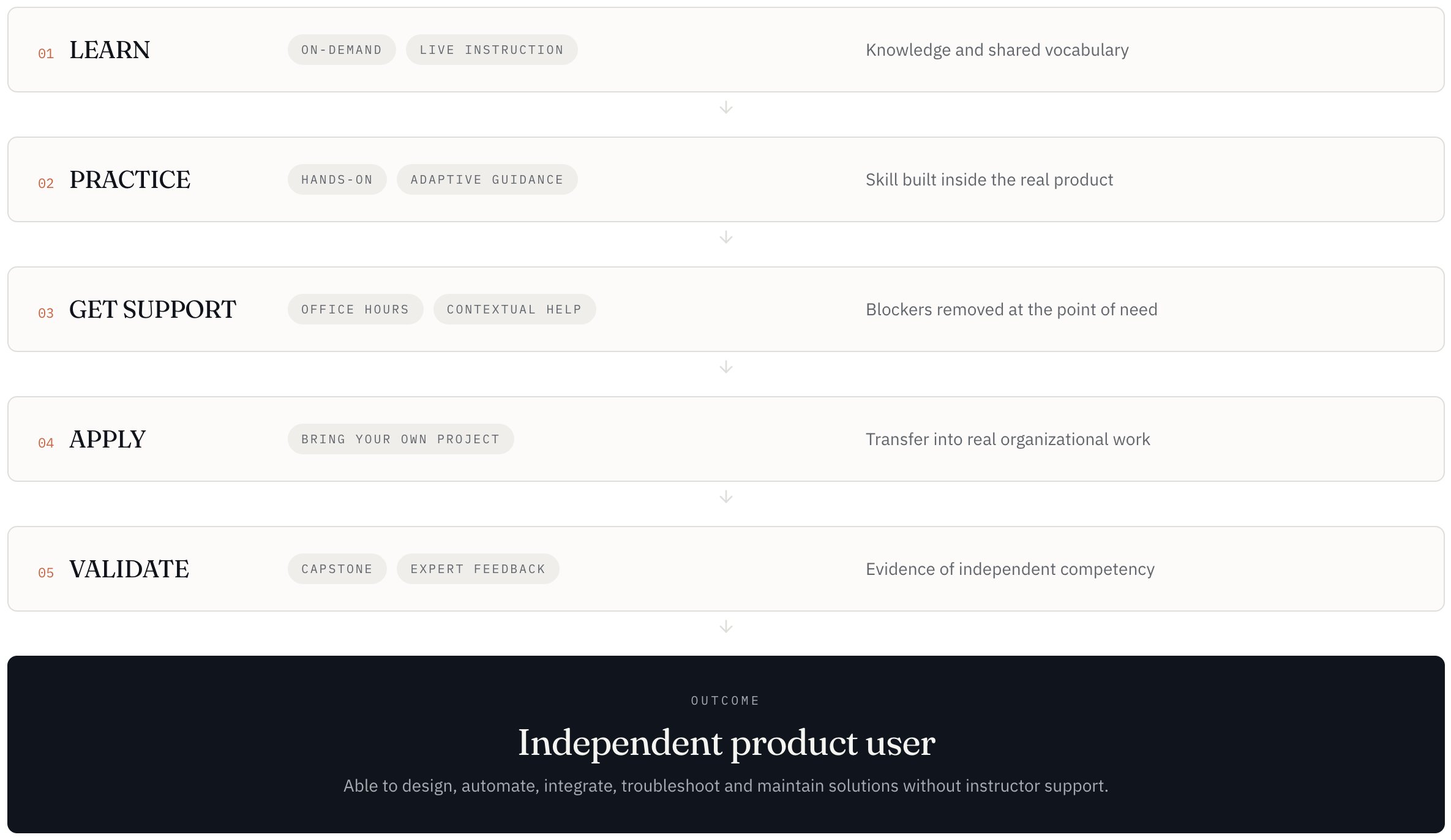
I mapped the journey around a progressive model:
Learn → Practice → Apply → Validate
The curriculum moves learners from platform foundations and form development through automation, integrations, and troubleshooting before transitioning them into a real-world project and competency-based capstone.
Rather than relying on a single training format, I matched each learning need to the modality best suited to it:
On-demand learning for foundational knowledge and reference
Live virtual sessions for explanation, demonstration, and discussion
Hands-on practice for building product skills
Adaptive learning for contextual guidance and intervention
1:1 office hours for individual blockers and complex questions
Bring Your Own Project for real-world application
Capstone assessment for validating independent competency
THE LEARNING ARCHITECTURE
Nine stages, each with a goal, objectives, modality and evidence.
The result was a structured learning journey designed to progressively shift responsibility from the instructor to the learner.
-
Performance Outcome: Describe the platform, terminology, core concepts, and product ecosystem.
Learning Objectives:
Explain the purpose and core capabilities of the platform
Identify the major areas of the product interface
Describe how forms, data, workflows and automation connect
Navigate to any core surface without assistance
Use foundational platform terminology correctly
Learning Modality: On-demand learning and optional live orientation
Learning Activity: Guided platform navigation exercise across five product surfaces.
-
Performance Outcome: Build functional forms using fields, validation, structure, and UX best practices.
Learning Objectives:
Create a new form from a blank canvas
Select field types appropriate to the data being collected
Configure labels, defaults, required states and validation
Organize a form into a logical, low-friction sequence
Preview and test a form before release
Learning Modality: On-demand learning, and live demonstration with hands-on practice
Learning Activity: Build a customer intake form to a written requirements brief
-
Performance Outcome: Create dynamic experiences using conditional logic and personalized form paths.
Learning Objectives:
Configure conditional show/hide rules on fields and sections
Combine multiple conditions into branching experiences
Apply conditional requirements and validation
Test every user path, including edge cases
Learning Modality: live virtual session, and guided hands-on lab with adaptive in-product learning
Learning Activity: Build a support form where questions change by request type
-
Performance Outcome: Configure workflows, triggers, conditions, actions, notifications, and business rules.
Learning Objectives:
Explain trigger / condition / action automation concepts
Configure a trigger and conditional branch on submission data
Route records, notifications and assignments to the right owner
Test an automation including failure and edge cases
Learning Modality: Live demonstration, hands-on practice with a scenario challenge
Learning Activity: Build a high-priority customer escalation workflow
-
Performance Outcome: Connect data between the platform and external systems while managing validation and errors.
Learning Objectives:
Describe how submissions become structured records
Map source fields to destination fields across systems
Configure a basic CRM or email integration
Diagnose common mapping and data-type errors
Decide when an integration is the right solution
Learning Modality: On-demand reference, and hands-on lab with 1:1 office hours
Learning Activity: Connect form submission data to a destination system
-
Performance Outcome: Develop independent problem-solving skills through realistic scenarios and targeted support.
Learning Objectives:
Apply a repeatable troubleshooting methodology
Interpret platform errors and isolate the failing component
Resolve configuration, condition and integration failures
Apply naming, organization and documentation best practices
Recognize when to escalate and how to frame the request
Learning Modality: Scenario-based practice, and adaptive intervention with office hours
Learning Activity: Diagnose and repair three deliberately broken workflows
-
Performance Outcome: Bring a real business problem into the learning environment and build a solution.
Learning Objectives:
Identify a meaningful business problem in their own organization
Translate stakeholder requirements into a solution design
Build, automate and integrate the solution end-to-end
Test against realistic scenarios and refine
Explain and defend their design decisions
Learning Modality: Bring Your Own Project, and office hours with contextual resources
Learning Activity: Design and build a solution for a real internal process
-
Performance Outcome: Demonstrate competency through a capstone project and expert feedback.
Learning Objectives:
Present a complete solution and the problem it solves
Justify field, logic, workflow and integration decisions
Demonstrate testing and troubleshooting evidence
Meet the competency rubric across all six areas
Learning Modality: Capstone assessment, with expert feedback session
Learning Activity: Submit and demonstrate the capstone build to a product specialist
THE MODALITY STRATEGY & OUTCOME
From the learning need, to modality, activity, and the evidence.
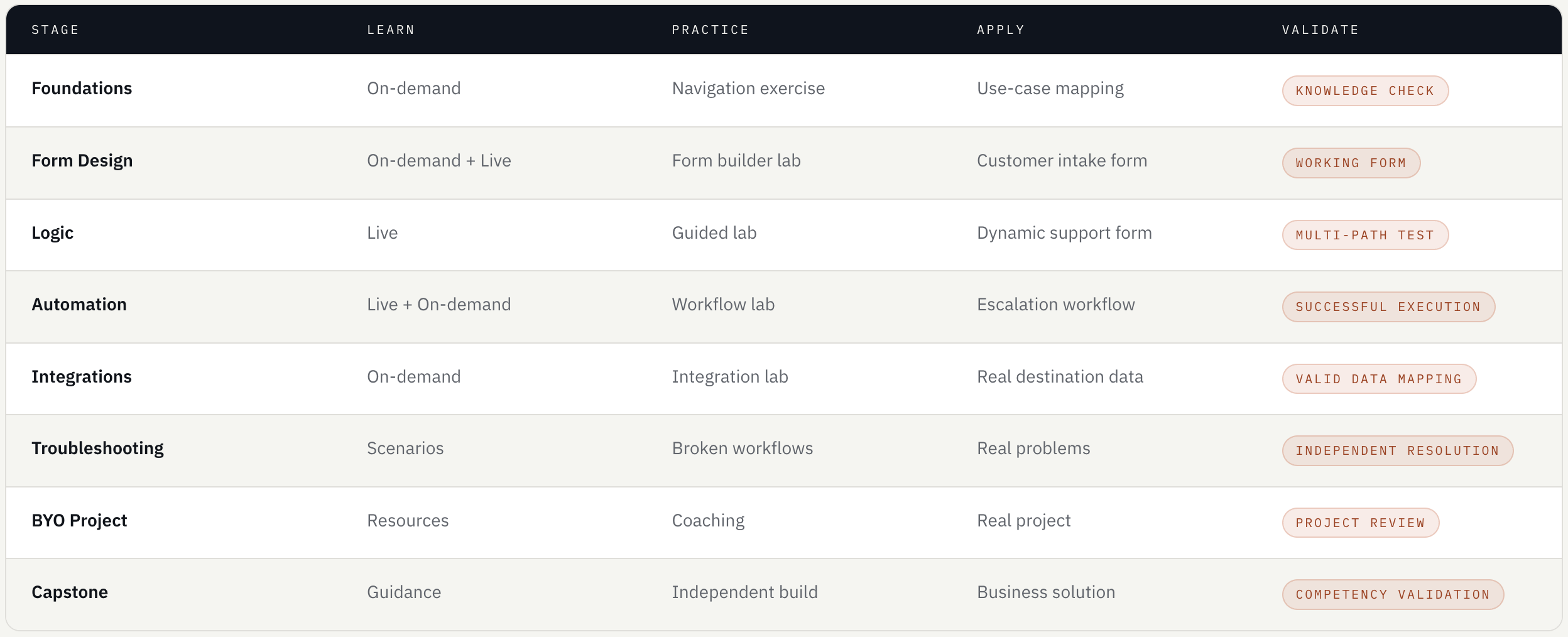
Each modality exists to solve a specific class of learning problem, and shows how every stage moves through learn, practice, apply and validate.
The outcome is a complete ecosystem; a learner confidence arc and a multi-evidence assessment strategy.
Best for:
Foundational concepts
Terminology
Product overviews
Short demonstrations
Reference material
Knowledge acquisition and reference.
01
On-demand learning
Best for:
Complex concepts
Product demonstrations
Discussion
Q&A
Guided exercises
Explanation, demonstration and human interaction.
02
Live virtual sessions
Best for:
Building forms
Configuring logic
Automation
Integration
Troubleshooting
Skill development right in the tool itself.
03
Hands-on product practice
Best for:
Hints
Guided walkthroughs
Additional explanation
Progressive difficulty
Targeted intervention
Respond to demonstrated learner needs.
04
Adaptive learning
Targeted, just-in-time human support and guidance.
05
1:1 office hours
Best for:
Individual blockers
Troubleshooting
Project guidance
Advanced questions
Best for:
Authentic application
Decision-making
Problem-solving
Independent work
Transfer learning into solving real work problems.
06
Bring Your Own Project
Best for:
Demonstration
Assessment
Expert feedback
Validation of independence
Competency validation and recognition.
07
Capstone
Let’s talk about what you’re trying to solve.
I take a small number of new engagements each year. If your challenge sounds like the work above, I’d love to hear about it.